


Video Browser
3.6125.00 Reviews
App Specs
- Version
- 1.18.1.0
- Updated On
- License
- Free
- Downloads
- 10,000,000+
- Developer
- PixelTivraStudios
- Categories
- Communication
- Platform
- Android
Screenshots


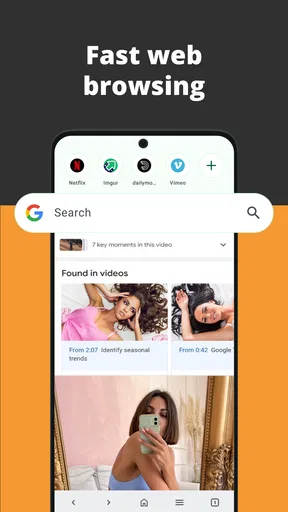

 Analysis by AppCompare
I can see the appeal of a browser built around finding videos and saving them for later, especially in a home where one phone or tablet gets passed around. A shared device can make casual viewing convenient, but it also means people should agree on what they save and which account or browsing context they use. That distinction matters more to me than a long feature list: a useful video browser should fit into household routines without making people assume it provides family controls or private profiles.
A shared screen needs a simple routine
Picture a parent using a tablet to find a cooking tutorial, then handing it to another adult who wants to browse travel clips. A video-focused browser can make that switch feel more direct than opening a general browser and rebuilding the search from scratch. In practice, I would keep a shared device’s saved items purposeful: bookmark a recipe or a repair guide when it is genuinely useful, and avoid treating bookmarks as a private to-do list if everyone can reach the same device.
That small habit is especially helpful when the household has different viewing interests. A saved video can be a handy handoff—“this is the one we’ll watch later”—but it can also become clutter if everyone saves everything. I’d periodically review the saved list together, removing finished tutorials and keeping only material that still has a reason to be there. This is a low-effort way to make the browser more useful without assuming it has household profiles or automated organization.
Separate browsing habits from account boundaries
Before letting several people use the same device, I would check which browser or service accounts are active and decide whether the device is meant for shared browsing or for one person’s personal use. A browser is not automatically a privacy boundary: someone else may see open pages, searches, bookmarks, or downloaded files if they use the same device. If account separation matters, switching to an individual device or a browser setup designed for separate profiles is a better choice than relying on a video browser to keep people apart.
There is also a practical difference between saving something inside a browser and downloading a file onto a device. A bookmark is a pointer to return to a page; a saved video may take up device storage and could remain available to whoever uses that device. I’d ask who is likely to use the phone or tablet before saving videos, and remove files that are no longer needed. That is a more dependable household rule than assuming saved content is automatically private or temporary.
For someone who wants to keep a personal watch list separate from a partner’s, a dedicated account or a personal device may be less awkward than sharing one installation. For occasional family viewing, by contrast, one shared list can be convenient if everyone understands that saved material is visible to the other users. The best setup depends on whether convenience or separation matters more in that household.
Coordinate before the video is needed
One useful workflow is to save a video when you find it, then tell the other person where it is saved and what it is for. For example, if I find instructions for assembling a shelf while commuting, I can bookmark the page and bring it up later when someone else is ready to help. That is more reliable than sending a vague message such as “I saw a useful video,” particularly when the person receiving it is also using the shared device.
Worth Reading Before You Choose

Baby Panda World Brings Quick Play to Modern Phones, but Its Game Library Feels Busy

ESPN’s Live Game View Makes Following Close Games Easier

QuizzLand Review: A Good Fit for Short Trivia Breaks, Not Every Player

Basketball Stars: Multiplayer Is Fast, but Can It Recover When Matches Go Wrong?

WEBTOON Turns Phone Updates Into a Better Reading Routine

Link to Windows Runs on Shared Habits, Not Social Feeds
I would not make a saved item the only copy of information the household needs. If a tutorial is important for a planned task, note its title or keep the relevant instructions somewhere accessible as well. A browser’s saved content depends on the original page remaining available, and downloads can be easier to find if the person who saved them remembers where they went. Treating the browser as a convenient viewing aid rather than a household archive avoids frustration later.
Video Browser is a free communication app from PixelTivraStudios. It has an average rating of 3.8 from around 35,000 ratings, and it has passed 10 million installs. Those figures suggest that it has reached a substantial audience, though popularity alone does not tell me whether its browsing approach suits a particular family or shared-device routine.
The app is rated for Everyone, but that age label is not a substitute for an adult’s judgment about what a child watches online. I would stay nearby when younger users browse, talk about which sites and videos are appropriate, and avoid leaving a shared device open to unrestricted browsing if that is not suitable for the household. The app’s age rating describes its content classification; it should not be read as a promise of parental supervision tools.
Who benefits, and who may prefer another browser
I think this kind of app makes most sense for someone who regularly discovers videos while browsing and wants a direct way to return to them or watch saved material later. It can suit commuters planning what to view offline, people who collect how-to videos for weekend projects, and households that share a tablet for casual searches. The useful question is not simply whether a person watches videos, but whether combining video discovery with saving fits the way they already browse.
If your priority is a familiar, general-purpose browser with established account syncing and a broader range of everyday web tools, your usual browser may be the better default. If you mostly watch through a particular video service, its own app may offer a more natural way to follow channels and manage viewing history. Video Browser’s video-first focus is a possible convenience, not an automatic replacement for those alternatives. I’d try it alongside an existing browser before moving all my searches over.
There is a trade-off in keeping video discovery and offline viewing in one place: it can reduce the steps between finding a clip and saving it, but it also makes the app’s download and bookmark habits part of your device routine. Before relying on offline viewing for a trip, I would save the material while connected, open the saved item once, and check that it is available as expected. That simple test is more useful than discovering on a train or in a low-signal area that a page cannot be reached.
On Android, the app’s current version is 1.8.1.0 and it requires Android 6.0 or later. It was released on September 30, 2025. Those details make the Android compatibility question easy to answer for an older device: check the operating system before trying to install it. The app is free, so a cautious trial alongside your existing browser is a reasonable way to decide whether its video-oriented approach earns a place on your home screen.
Getting Started with Video Browser
First things first, downloading the Video Browser app is a breeze. Available for both Android and iOS, you just need to hit the download link, and voila, you’re ready to explore the video universe. The installation process is straightforward, with no hidden surprises or annoying ads popping up. Once installed, the app greets you with a clean and simple interface that’s incredibly intuitive.
Interface and Usability
The user interface is where Video Browser truly shines. It’s designed with a minimalist approach, ensuring that users of all tech levels can navigate it with ease. The menu is straightforward, featuring options like Home, Trending, Favorites, and Categories. Each section is well-organized, making it easy to find exactly what you’re looking for without any fuss.
One of the standout features is the customizable homepage. You can tweak it to display your favorite categories or channels right at the top. This personalization aspect makes a massive difference, especially if you have specific interests you like to keep up with.
Browsing Experience
When it comes to browsing, Video Browser does not disappoint. The app loads videos quickly and offers seamless navigation between different sections. You can switch from trending videos to your personalized list without any lag, which is something I really appreciate in a video app.
Another cool feature is the smart search function. It uses predictive text to help you find videos faster. Just start typing, and the app will suggest popular searches, saving you time and effort.
Unique Features Worth Noting
Now, let’s talk about some of the unique features that make Video Browser stand out. For starters, there’s the offline mode. Yes, you heard that right! You can download your favorite videos and watch them later without needing an internet connection. Perfect for those long commutes or when you're off the grid.
The app also includes a handy bookmark feature. You can save videos to watch later, which is a lifesaver if you stumble upon a gem but don’t have the time to watch it immediately.
Performance and Reliability
Performance-wise, Video Browser is rock solid. I’ve been using it for a few weeks now, and not once has it crashed or glitched out on me. It handles HD videos like a champ, and the streaming quality is top-notch, with no buffering issues, even on a moderately fast internet connection.
In terms of reliability, the app updates regularly, ensuring that any bugs are quickly squashed. The developers seem committed to providing a smooth experience, which is always a good sign.
Final Thoughts
All in all, Video Browser is a fantastic app for anyone who loves watching videos online. Its user-friendly interface, coupled with its powerful features, makes it a must-have for video enthusiasts. Whether you’re into trending clips, educational content, or just some good old entertainment, this app has got you covered.
So, if you’re tired of the clutter and chaos of traditional video platforms, give Video Browser a try. It might just become your new favorite way to explore the world of online videos.
A sensible household verdict
For a household, I see this as a convenience tool rather than a shared-account solution. It can help people discover clips, keep useful pages close, and prepare viewing for a time when internet access is limited. I would use it for low-stakes coordination—recipes, travel ideas, repair guides, or entertainment everyone has agreed to watch—while keeping personal browsing and sensitive accounts on an individual setup.
The main thing I would not assume is that a video browser automatically makes shared use safe, organized, or child-directed. Adults still need to set expectations, check what is being opened, and decide whether saved files belong on a device other people use. If those boundaries are clear, the app’s video-centric approach may make a shared screen easier to use. If the household needs separate histories, strong parental oversight, or a fully familiar all-purpose browser, I would choose a tool built around those needs instead.
Pros
- User-friendly interface for easy navigation.
- Supports a wide range of video formats.
- Fast download speeds for offline viewing.
- Built-in video player with HD support.
- Customizable playlists for better organization.
Cons
- Limited advanced features for editing.
- Advertisements can be intrusive at times.
- Requires internet for initial video loading.
- Some videos may not be downloadable.
- Occasional bugs in the search function.
FAQs for Video Browser
What is Video Browser and what does it offer?
Video Browser is a versatile app designed to enhance your online video streaming experience. It allows users to browse, search, and play videos from multiple platforms with ease. The app provides features such as bookmarking, seamless playback, and personalized recommendations, making it a convenient tool for video enthusiasts.
Is Video Browser available on both Android and iOS?
Yes, Video Browser is available for download on both Android and iOS platforms. Users can easily find it on the Google Play Store for Android devices and the Apple App Store for iOS devices. Ensure that your device meets the minimum system requirements for optimal performance.
Does Video Browser support offline viewing?
Currently, Video Browser does not support offline viewing. The app is primarily designed for streaming videos online. However, users can bookmark their favorite videos for quick access. Future updates may include offline capabilities, so keep an eye out for new features.
Are there any subscription fees for using Video Browser?
Video Browser offers a free version with basic features and ad support. There is also a premium subscription available, which provides an ad-free experience along with additional features such as enhanced search options and priority customer support. Users can choose according to their preferences.
How does Video Browser ensure user privacy and data security?
Video Browser prioritizes user privacy and data security by implementing robust encryption and secure connections. The app does not store personal information beyond what is necessary for functionality. Users are encouraged to review the privacy policy and terms of use to understand data handling practices fully.


